
Schedule
Coordinate an intensively used fleet.
Flydesk connects aircraft scheduling, hours, flight routes, maintenance blocks, fuel, automated Aircraft Technical Log entries and operating costs.
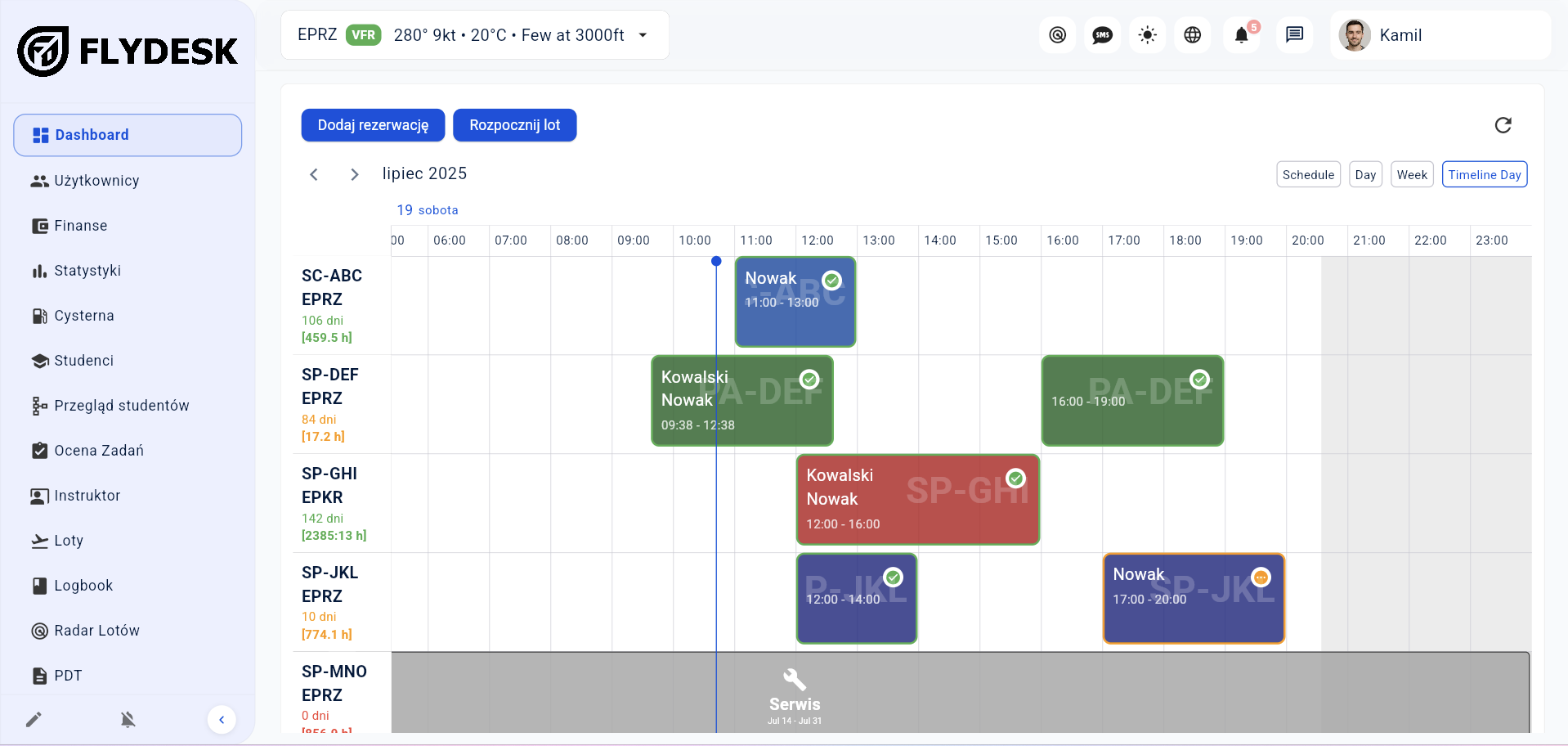
In short: Flydesk provides one current view of every aircraft, including saved flight routes that can be checked as they are recorded, bookings, hours, records and maintenance blocks.
See bookings, flights and maintenance blocks in the calendar.
Completed operations update information used for planning.
Save flight routes and review their current progress directly in the system.
Find aircraft available for the selected period.
Assign the aircraft to an operation.
Add actual times and operational data.
Use current hours, records and utilization data.
Coordinate an intensively used fleet.
Show unavailable periods where bookings are created.
Keep routes with the correct aircraft and generate records from completed flights.
Support pre-flight calculations with a dedicated module.
The final setup depends on your organization, fleet and operating model. We cover the details during a tailored demo.
The calendar exposes existing operations and unavailable periods while planning.
Yes. The setup is tailored to the aircraft used by the organization.
Yes. Flydesk uses aircraft and flight data to prepare the log automatically.
Book a short presentation tailored to your fleet, training programs and daily workflow.